
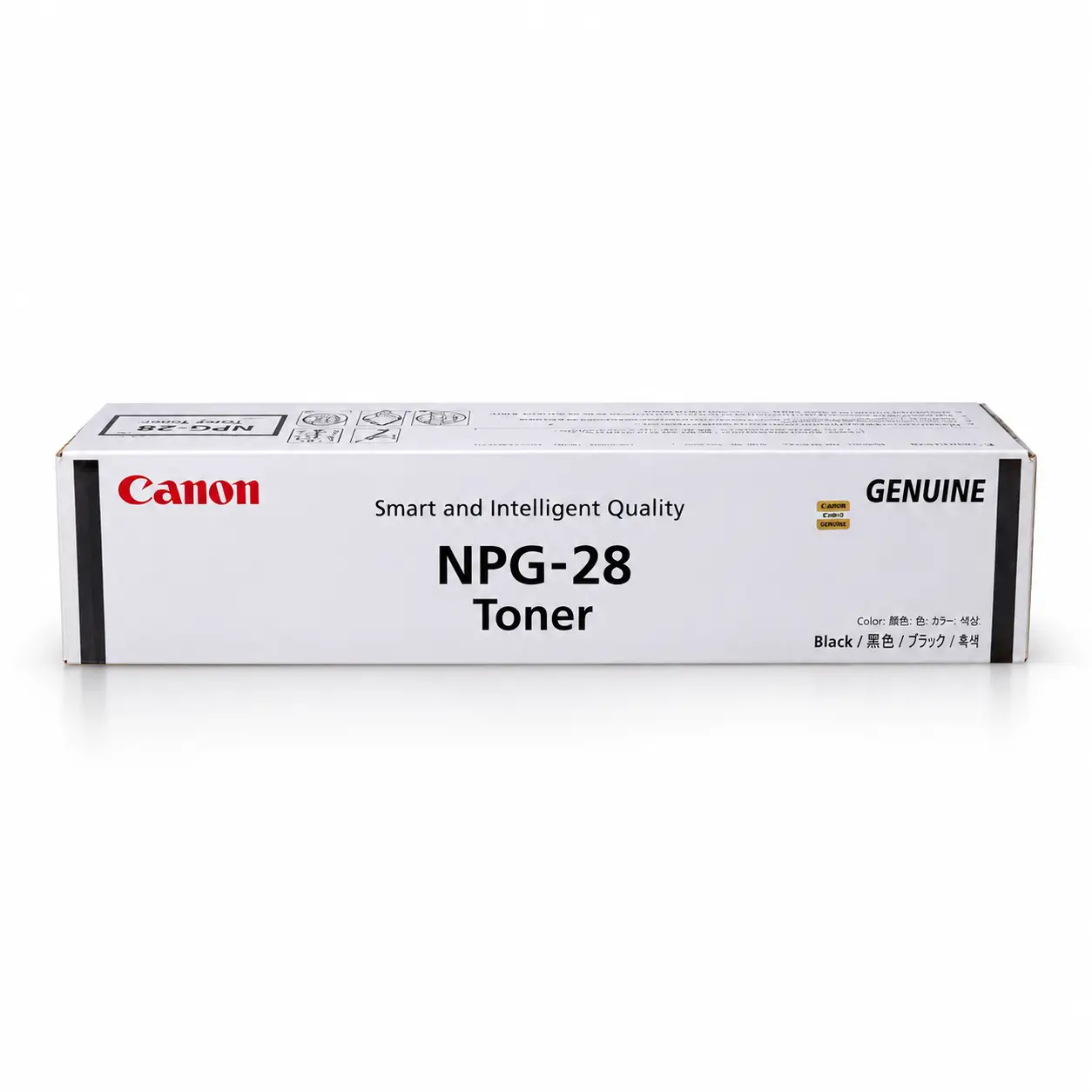


Canon NPG-28 Genuine Toner
-
Quick Overview
- Item Category: Copier Toner
- Printing Color: Black
- Printing Technology: Laser
- Duty Cycle / Yield: 8,300
- Product Type: Toner Cartridge
- Compatible Models: imageRUNNER IR2016, IR2020, iR2022, iR2025, iR2028, iR-2420L, iR-2022L Canon Photocopier.
Order now or call us for product details and availability. 01727757903
৳ 1,600 ৳ 2,200
Canon NPG-28 Genuine Toner: The Ultimate Printing Solution Guide
Table of Contents
-
Introduction to Canon NPG-28 Genuine Toner
-
What Is Canon NPG-28 Genuine Toner?
-
Key Features and Performance Benefits
-
Detailed Technical Specifications
-
Photocopier & MFP Hardware Compatibility
-
Why Choose Genuine Canon Toner for imageRUNNER Series?
-
How to Verify Authenticity via Official Canon Resources
-
Understanding Page Yield & Cost-Per-Page Analysis
-
How to Spot Quality vs. Counterfeit Toner
-
Business Applications and Key Uses
-
Step-by-Step Installation & Replacement Guide
-
Storage & Handling Best Practices
-
Common Troubleshooting Steps for Canon Toners
-
Environmental Sustainability & Eco-Friendly Practices
-
Why Buy from Unique Copier?
-
How to Place an Order Online at UniqueCopier.com
-
Frequently Asked Questions (FAQ)
-
Final Verdict
1. Introduction to Canon NPG-28 Genuine Toner
In today’s fast-paced corporate offices, educational institutions, government agencies, financial hubs, and commercial print shops across Bangladesh—from Dhaka and Chittagong to Sylhet, Rajshahi, and Khulna—uninterrupted document flow is essential. Daily business operations require printing high volumes of administrative memos, legal contracts, financial ledgers, tax invoices, academic test papers, and official correspondence without operational delays or text fading.
Multifunction digital photocopiers (MFPs) manufactured by Canon Inc., specifically the iconic imageRUNNER monochrome series, are globally renowned for their operational durability, high output speeds, and low maintenance overhead. However, even the most robust Canon digital copier depends entirely on the quality of its consumable supplies to deliver crisp, dark, and consistent results.
The Canon NPG-28 Genuine Toner is a high-capacity monochrome laser toner kit manufactured specifically to keep compatible Canon imageRUNNER copiers running at peak performance. Designed for precision electrostatic imaging, this genuine toner kit delivers high-density black output, fine character definition, zero background dusting, and dependable day-to-day operation.
At Unique Copier, we provide verified, top-tier printing supplies to maintain your workplace productivity. Reviewing technical specs, verifying machine compatibility, and understanding expected page yields will help you make a confident, cost-smart purchasing decision for your organization.
2. What Is Canon NPG-28 Genuine Toner?
The Canon NPG-28 Genuine Toner is an Original Equipment Manufacturer (OEM) monochrome black laser toner cartridge produced directly by Canon for select A3 imageRUNNER digital photocopiers. It contains refined microfine black carbon toner powder formulated specifically for precise laser electrostatic transfer and controlled fuser heating.
Unlike low-grade generic or third-party refilled powders that melt inconsistently or leave residual dust inside machine bays, the Canon NPG-28 genuine toner formulation features uniform spherical particles. This micro-level particle precision allows toner to transfer smoothly and bond permanently with paper fibers without causing excessive mechanical friction on drum cleaning blades, developer units, or heating rollers.
Checking the exact model code—Canon NPG-28 Genuine Toner (or part code NPG28)—helps procurement managers ensure that they are acquiring the exact OEM consumable kit required for their workplace printer series.
3. Key Features and Performance Benefits
Choosing the genuine Canon NPG-28 Toner cartridge for your office copier provides several distinct operational advantages:
A. Deep Black Contrast & Crisp Typography
Formulated with high-purity carbon black particles, the NPG-28 toner delivers rich black text, sharp character edges, and precise line reproduction. Small-font financial ledgers, legal briefs, and intricate barcodes print with archival clarity without feathered edges, light spots, or fuzzy backgrounds.
B. Exceptional Long-Term Cost Efficiency
For high-volume print environments, per-page operational costs dictate overall office overhead. The Canon NPG-28 cartridge yields thousands of standard copies, dramatically reducing per-page expenses and maximizing your return on equipment investment.
C. Extended Protection for Electrostatic Drums & Fuser Units
Uniform particle sizing ensures smooth electrostatic transfer. By preventing coarse dust buildup and uneven thermal adhesion, this genuine toner minimizes mechanical wear, protecting your copier’s primary drum unit and fuser rollers from premature scoring or degradation.
D. Clean, Zero-Leakage Powder Housing
Constructed with durable housing materials and precise factory seals, the cartridge prevents internal powder spillage. This maintains clean machine interiors, prevents dirty copies, and protects indoor air quality in corporate office spaces.
E. Effortless Tool-Free Installation
The NPG-28 cartridge matches the exact physical dimensions and guide-rail tracks of compatible Canon imageRUNNER machines, making supply changeovers quick, clean, and effortless for office staff.
4. Detailed Technical Specifications
Review the technical attributes of the Canon NPG-28 Genuine Toner before placing your order:
| Technical Feature / Attribute | Specification Details |
| Product Name | Canon NPG-28 Genuine Toner |
| Model / Part Code | NPG-28 / NPG 28 / NPG28 |
| Manufacturer | Canon Inc. |
| Consumable Type | Genuine OEM Black Photocopier Laser Toner |
| Toner Powder Color | Black (Monochrome) |
| Print Technology | Monocomponent Electrostatic Laser Transfer |
| Average Page Yield | Approx. 8,300 Pages (A4 at 5% ISO/IEC coverage) |
| Powder Net Weight | Approx. 460 grams |
| Compatible Equipment | Canon imageRUNNERIR 2016, IR2020, iR2022, iR2025, iR2028, iR-2420L, iR-2022L |
| Quality Certifications | ISO 9001 / ISO 14001 Standards |
| Official Verification | Verified via Canon Official Website |
5. Photocopier & MFP Hardware Compatibility
Verifying hardware compatibility is the most critical step before buying replacement toner. While many Canon imageRUNNER digital photocopier models share similar outer cabinet designs, placing an incorrect cartridge code into a machine bay can lead to fitting issues or electronic sensor errors.
The Canon NPG-28 Genuine Toner is explicitly designed and verified for the following monochrome Canon imageRUNNER multifunction digital copier models:
-
Canon imageRUNNER 2016 / 2016i
-
Canon imageRUNNER 2018 / 2018i
-
Canon imageRUNNER 2020 / 2020i
-
Canon imageRUNNER 2022 / 2022i
-
Canon imageRUNNER 2025 / 2030
-
Canon imageRUNNER 2116 / 2120
-
Canon imageRUNNER 2318L / 2320L / 2420L
Buyer’s Tip: Always verify the exact model code printed on the front access door of your Canon copier or cross-reference your existing cartridge label prior to placing an online order.
6. Why Choose Genuine Canon Toner for imageRUNNER Series?
Investing in authentic Canon NPG-28 Genuine Toner designed specifically for imageRUNNER digital copiers protects both your financial budget and your machinery hardware:
-
Preserves Copier Lifespan: Coarse, low-grade third-party powders act like fine sandpaper on delicate photoconductor drums and fuser belts. Genuine Canon NPG-28 toner uses smooth micro-particles that preserve expensive internal components.
-
Consistent Density across Long Print Runs: Low-quality powders tend to lose print density halfway through large print jobs. Canon NPG-28 Genuine Toner maintains uniform darkness from the first copy to the last.
-
Smudge-Free Instant Drying: Advanced resin compounds inside the toner powder react instantly to fuser heat rollers, ensuring prints dry immediately as they hit the exit tray without smudging onto fingers or adjacent sheets.
-
Minimizes Maintenance Downtime: Clean-burning toner powder leaves minimal excess dust in developer waste boxes, reducing the need for emergency service calls and costly technician visits.
7. How to Verify Authenticity via Official Canon Resources
When managing expensive corporate machinery, confirming consumable specs and compatibility independently gives procurement managers complete peace of mind.
If you ever wish to double-check technical documentation, driver downloads, or equipment accessory guides, you can visit the Canon Official Website. Cross-referencing your photocopier’s exact model series with official manufacturer resources ensures you order the exact OEM supply kit required for your machine.
8. Understanding Page Yield & Cost-Per-Page Analysis
To evaluate the true value of any photocopier toner, business managers must look beyond the initial purchase price and calculate the Cost-Per-Page (CPP).
What Is Page Yield?
Page yield refers to the estimated total number of standard pages a cartridge can produce before running out of powder. Standard industry testing follows ISO/IEC 19752 metrics, assuming 5% page coverage on A4 paper (equivalent to a standard single-spaced business letter).
Factors Influencing Real-World Output:
While rated yield serves as a baseline benchmark, actual output varies based on daily office printing habits:
-
Text Coverage & Density: Printing bold graphics, dark spreadsheets, scanned certificates, or thick black headers uses significantly more powder per page than simple text.
-
Paper Media Size: Printing on A3 ledger paper consumes double the toner of a standard A4 sheet.
-
Copier Darkness Settings: Operating your Canon machine on maximum dark contrast settings consumes powder faster than draft or eco modes.
-
Ambient Humidity: High office humidity can affect how toner powder holds its static charge, slightly altering consumption rates during high-volume copy jobs.
9. How to Spot Quality vs. Counterfeit Toner
Using low-grade or counterfeit cartridges can lead to gray line streaks, dark background shading, powder leakage, and drum scoring. Inspect replacement cartridges using these verification checks:
-
Optical Security Hologram: Authentic Canon packaging includes an optical hologram sticker that displays multi-dimensional color shifts and sharp logos when tilted under bright light.
-
Packaging Typography and Labels: Genuine packaging features clean fonts, accurate model codes (NPG-28), and clear barcode stickers. Substandard boxes often display blurry text or misaligned logos.
-
Factory Security Seals: Check that protective pull-tabs and plastic wrapping are intact before opening.
-
Cartridge Weight: Full NPG-28 cartridges have a distinct solid weight due to exact factory powder fill levels. Suspiciously light cartridges are often underfilled.
-
Buy from Verified Suppliers: Purchasing directly from trusted office supply specialists like uniquecopier.com eliminates the risk of receiving low-quality, underfilled supplies.
10. Business Applications and Key Uses
The Canon NPG-28 Genuine Toner supports high-volume document workflows across diverse business sectors in Bangladesh:
-
Corporate Memos & Administration: Renders crisp internal office communications, policy guidelines, and executive memos.
-
Accounting & Financial Firms: Prints small-font spreadsheets, audit sheets, balance ledgers, and tax invoices with precise line clarity.
-
Legal Filings: Produces archival-quality contrast for court briefs, contracts, deeds, and official compliance paperwork.
-
Educational Institutions: Handles high-volume exam question papers, syllabus sheets, and administrative notices.
-
Commercial Copy Centers: Provides reliable, continuous performance for commercial customer photocopying tasks without stopping for cool-downs.
11. Step-by-Step Installation & Replacement Guide
Replacing a spent Canon NPG-28 Genuine Toner on your imageRUNNER copier is simple and requires no specialized tools. Follow these steps:
+-------------------------------------------------------+
|  Step 1: Open the front access cover of the copier    |
+-------------------------------------------------------+
                           ↓
+-------------------------------------------------------+
|  Step 2: Turn the toner lock lever to unlock position  |
+-------------------------------------------------------+
                           ↓
+-------------------------------------------------------+
|  Step 3: Carefully slide out the spent cartridge      |
+-------------------------------------------------------+
                           ↓
+-------------------------------------------------------+
|  Step 4: Unpack new NPG-28 & rock 5-6 times gently    |
+-------------------------------------------------------+
                           ↓
+-------------------------------------------------------+
|  Step 5: Slide new cartridge into slot & lock lever   |
+-------------------------------------------------------+
                           ↓
+-------------------------------------------------------+
|  Step 6: Close door & run a sample test print/copy    |
+-------------------------------------------------------+
Detailed Instructions:
-
Power On Machine: Ensure your Canon digital photocopier is powered on.
-
Open Access Panel: Gently open the main front access cover on your Canon machine body.
-
Unlock Spent Cartridge: Rotate the toner release lever to the unlocked position.
-
Remove Spent Container: Hold the cartridge handle and pull the empty unit straight out carefully. Place it on scrap paper to catch residual dust.
-
Prepare New Cartridge: Unbox your new Canon NPG-28 Genuine Toner from uniquecopier.com. Hold it horizontally with both hands and rock it side-to-side 5 to 6 times to loosen settled powder evenly.
-
Insert New Unit: Align the cartridge with the internal guide rails and slide it in firmly until it seats properly.
-
Engage Lock: Rotate the locking lever back into place to seal the cartridge mechanism.
-
Close Door & Test: Close the front access cover firmly. Allow the machine 15–30 seconds to warm up, then run a test copy to confirm crisp print output.
12. Storage & Handling Best Practices
Proper storage extends the shelf life of spare toner cartridges and maintains consistent performance:
-
Keep Packaging Sealed: Keep spare cartridges inside their original sealed foil bags until the exact moment of installation.
-
Store Horizontally: Always lay toner boxes flat on a shelf. Storing cartridges on end causes toner powder to settle at one end, leading to uneven print density.
-
Temperature & Humidity Control: Store in a cool, dry room between 10°C and 30°C (50°F–86°F). Avoid direct sunlight, radiators, or damp concrete floors.
-
Avoid Electromagnetic Fields: Keep stored supplies away from heavy electric motors or high-magnetic sources.
13. Common Troubleshooting Steps for Canon Toners
If you encounter minor output issues after replacing toner, try these simple diagnostic steps:
-
Faded or Light Copies: Remove the cartridge and rock it horizontally a few times to loosen compressed powder. Check if “Toner Save / Eco Mode” is enabled in printer settings.
-
“Toner Not Recognized” Error Message: Open the front door, remove the cartridge, ensure guide tracks are clean of paper dust, reinsert firmly, and re-engage the locking lever.
-
Vertical Lines or Background Dusting: Clean the main charger wire or scanner platen glass using the built-in cleaner tool or a soft lint-free microfiber cloth as outlined in your Canon user manual.
14. Environmental Sustainability & Eco-Friendly Practices
Modern business standards place strong emphasis on environmental responsibility and sustainable office management:
-
Recyclable Plastic Housing: Canon NPG-28 Genuine Toner are constructed using recyclable thermoplastic materials. Spent cartridges should be collected for electronic waste recycling rather than discarded in general trash.
-
Non-Toxic Powder Formulation: Quality Canon toner formulations contain no hazardous heavy metals such as lead, mercury, or cadmium, keeping indoor office air safe during continuous high-volume printing runs.
-
Eco-Printing Tip: Enable automatic two-sided (duplex) printing on your Canon copier to reduce office paper consumption by up to 50%.
15. Why Buy from Unique Copier?
When sourcing office photocopier supplies in Bangladesh, choosing a reliable partner ensures authentic products, fair market pricing, and dependable delivery. uniquecopier.com provides a trusted e-commerce platform tailored specifically for printing consumables.
Explore our full range of original and compatible toner supplies by visiting the Unique Copier Toner Cartridges Collection page to find exact replacement cartridges for all major photocopier brands.
Why businesses across Bangladesh rely on uniquecopier.com:
-
Guaranteed Stock Availability: We maintain steady inventory so your office never faces sudden supply shortages.
-
Transparent Market Pricing: Clear, competitive pricing without hidden fees.
-
Rigorous Quality Inspection: Every cartridge is checked for packaging integrity before dispatch.
-
Fast Nationwide Delivery: Prompt delivery services across Dhaka and all 64 districts of Bangladesh.
-
Flexible Payment Gateways: Convenient payment choices including Cash on Delivery (COD), bKash, Nagad, and secure online transfers.
16. How to Place an Order Online at UniqueCopier.com
Ordering your replacement Canon toner online takes only a few simple steps:
-
Visit Website: Open your web browser and navigate to uniquecopier.com.
-
Search Product: Type “Canon NPG-28 Genuine Toner” into the search bar or browse the Unique Copier Toner Cartridges Collection.
-
Review Product Page: Click on the listing to check technical specs, live pricing, and stock availability.
-
Add to Cart: Select your required quantity and click “Add to Cart” or “Buy Now”.
-
Enter Shipping Address: Provide your name, mobile number, company name, and full address in Bangladesh.
-
Select Payment & Confirm: Choose Cash on Delivery (COD) or Mobile Financial Payment, then click “Place Order”. You will receive an immediate SMS confirmation with your order tracking ID.
17. Frequently Asked Questions (FAQ)
Q1: What is the Canon NPG-28 Genuine Toner?
A: It is a high-performance OEM black laser toner cartridge designed for compatible Canon imageRUNNER monochrome digital photocopiers.
Q2: Which printer models use the Canon NPG-28 toner?
A: It is compatible with Canon imageRUNNER IR2016, IR2020, iR2022, iR2025, iR2028, iR-2420L, iR-2022L copier models.
Q3: How can I independently verify my Canon photocopier compatibility?
A: You can check your copier’s front access panel model number or cross-reference technical documentation on the Canon Official Website before purchasing.
Q4: How should I store a spare Canon NPG-28 Genuine Toner?
A: Keep it stored horizontally in its original sealed packaging in a cool, dry room away from direct heat, humidity, and sunlight.
Q5: What is the average page yield of this toner cartridge?
A: It yields approximately 8,300 pages based on standard ISO/IEC 5% average page coverage on A4 paper.
18. Final Verdict
The Canon NPG-28 Genuine Toner is an essential consumable for businesses and organizations seeking cost-effective, high-volume monochrome printing. Delivering rich black text contrast, dependable hardware protection, and smooth drop-in installation, it protects your operating budget and maintains high office productivity.
Verify your copier model code, check options on the Unique Copier Toner Cartridges Collection, follow correct installation steps, and order your replacement supplies from trusted vendors like uniquecopier.com for optimal performance!
Based on 0 reviews
Be the first to review “Canon NPG-28 Genuine Toner”
Related products
-
Kyocera, Toner Cartridge, Uncategorized
Kyocera TK-7130 Genuine Toner Cartridge
Quick Overview
Brand: KYOCERAModel: TK-7130 Genuine Toner Cartridge- ✅Colour Type: Black
- ✅Print Technology: Laser
- ✅Printing Yield (Approx): 20,000 Pages
- ✅Compatible: Kyocera Taskalfa MZ3200i
Kyocera TK-7130 Genuine Toner Cartridge Order now or call us for product details and availability. 01727757903
SKU: n/a -
-
Toner Cartridge, Kyocera
Kyocera TK-6110 Genuine Black Toner
Quick Overview
Brand: KyoceraModel: TK-6110 Genuine Black Toner- Colour Type: Black
- Print Technology: Laser
- Printing Yield (Approx): 12,000 Pages
- Compatible: ECOSYS M4125idn, M4132idn
Kyocera TK-6110 Genuine Black Toner Order now or call us for product details and availability. 01727757903
SKU: n/a
There are no reviews yet.