
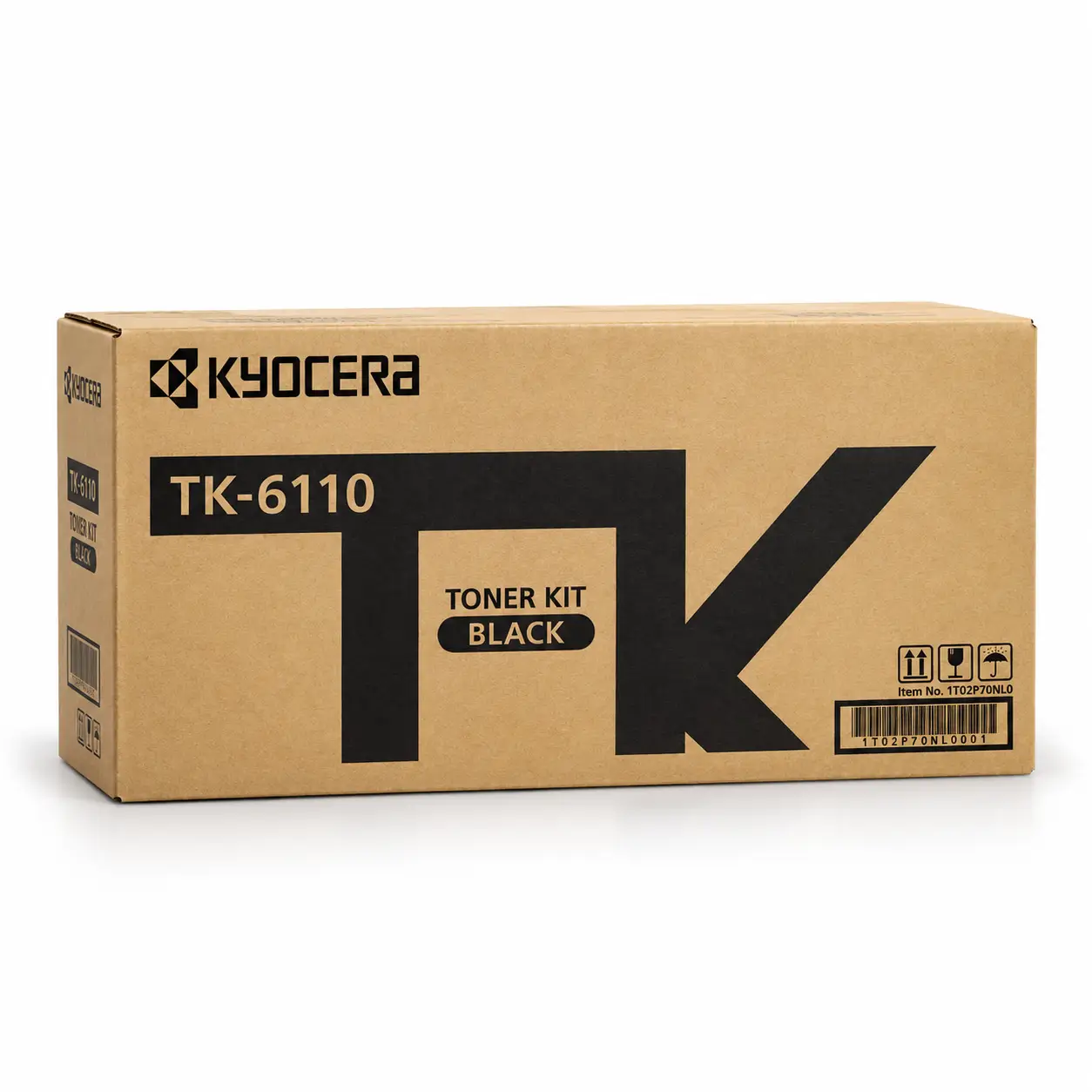


Kyocera TK-6110 Genuine Black Toner
Table of Contents
- Introduction to Kyocera TK-6110 Genuine Black Toner
- What Is Kyocera TK-6110 Genuine Black Toner?
- Key Features of Kyocera TK-6110 Genuine Black Toner
- Kyocera TK-6110 Genuine Black Toner Specifications
- Kyocera TK-6110 Genuine Black Toner Compatibility
- Why Choose Genuine Kyocera Black Toner?
- Understanding the Page Yield of Kyocera TK-6110 Genuine Black Toner
- Applications of Kyocera TK-6110 Genuine Black Toner
- How to Install Kyocera TK-6110 Genuine Black Toner
- Tips for Storing and Handling Kyocera Toner
- Troubleshooting Common Toner-Related Issues
- Buy Kyocera TK-6110 Genuine Black Toner from Unique Copier
- Frequently Asked Questions About Kyocera TK-6110 Genuine Black Toner
- Final Thoughts on Kyocera TK-6110 Genuine Black Toner
Introduction to Kyocera TK-6110 Genuine Black Toner
The Kyocera TK-6110 Genuine Black Toner is a black laser toner kit designed for compatible Kyocera ECOSYS multifunction printers. It is a suitable choice for offices, corporate workplaces, educational institutions, businesses, and professional environments that depend on consistent black-and-white printing for their daily operations. From office documents and business reports to invoices, forms, letters, and administrative paperwork, the right toner helps maintain dependable print quality and supports a smooth document workflow.
Choosing the correct toner cartridge is essential for maintaining printing performance. A toner kit designed for a compatible printer helps deliver readable text, professional-looking documents, and dependable everyday output. For businesses that print regularly, using the appropriate toner model also helps reduce unnecessary interruptions caused by incorrect supplies or unsuitable replacement products.
At Unique Copier, we understand that businesses need reliable printing supplies to keep their operations running efficiently. If you are searching for the Kyocera TK-6110 Genuine Black Toner, it is important to verify your printer model, check the toner code on your existing cartridge, and select the correct replacement before placing an order. This simple step can help you avoid compatibility problems and make a more informed purchasing decision.
What Is Kyocera TK-6110 Genuine Black Toner?
The Kyocera TK-6110 is a black toner kit associated with Kyocera ECOSYS printing equipment. It is intended for compatible laser printing systems and supports black-and-white document production. The toner is used to create text, lines, graphics, tables, and other printed elements required for everyday office work.
Genuine toner is manufactured and supplied for use within the relevant manufacturer’s printing system. Selecting the correct genuine consumable can help users maintain a consistent printing routine and avoid the uncertainty associated with products that have unclear origins or unverified compatibility.
The TK-6110 product code is particularly important when purchasing replacement toner. Different Kyocera toner models can look similar while supporting different machines. Therefore, do not select a toner cartridge based only on its appearance or brand name. Always compare the product code with your printer’s documentation and the label on your existing toner kit.
For customers who need additional printing supplies, visit the Unique Copier toner cartridge collection to explore other toner products.
Key Features of Kyocera TK-6110 Genuine Black Toner
1. Genuine Kyocera Toner Kit
The Kyocera TK-6110 Genuine Black Toner is intended for users looking for the specified Kyocera toner model rather than an unidentified replacement. Choosing a genuine product from a reliable supplier helps you make a more informed decision about the consumable being installed in your printer.
Before buying, check the packaging, model number, product description, and supplier information. These checks are especially useful for offices that manage several printers and need to keep the correct consumables available for each machine.
2. Professional Black-and-White Printing
Black toner is essential for producing readable text and clear monochrome documents. Businesses use black-and-white printing for letters, invoices, reports, office forms, quotations, statements, and internal records.
When used in a compatible and properly maintained printer, the correct toner helps support the printer’s intended output quality. Actual results depend on the printer condition, paper quality, document design, print settings, and maintenance practices.
3. Designed for Compatible Kyocera ECOSYS Equipment
The TK-6110 is listed in Kyocera product information for the ECOSYS M4125idn. Printer compatibility should always be confirmed against the exact model and regional specification before ordering. Some regional product listings report different yields for related printer models, so avoid assuming that every ECOSYS machine uses the same toner.
4. Practical for Routine Office Work
Offices need supplies that support daily printing without adding unnecessary complexity to purchasing and inventory management. Keeping the correct toner model on hand can make replacement planning easier and help staff avoid last-minute searches for compatible consumables.
5. Helps Maintain a Consistent Printing Workflow
Using the specified toner model is one part of maintaining a dependable printing workflow. Correct installation, suitable paper, regular printer maintenance, and proper handling of consumables also matter. When these practices are followed, businesses can manage routine printing tasks more confidently.
Kyocera TK-6110 Genuine Black Toner Specifications
Review the following key product details before purchasing.
| Specification | Details |
|---|---|
| Brand | Kyocera |
| Model | TK-6110 |
| Product type | Genuine black toner kit |
| Toner colour | Black |
| Printing technology | Laser |
| Printer series | Compatible Kyocera ECOSYS equipment |
| Verified model reference | ECOSYS M4125idn |
| Approximate yield | Around 12,000 pages in one regional specification |
| Yield conditions | Actual results vary with coverage, settings, and usage |
| Recommended action | Verify the exact printer model and toner code before ordering |
Important: The approximate page yield is a reference, not a guarantee that every customer will print the same number of pages. Regional Kyocera specifications and listed yields may differ by model. Confirm the current specification for your printer before purchase.
Kyocera TK-6110 Genuine Black Toner Compatibility
Compatibility is one of the most important factors when selecting replacement toner. The TK-6110 is listed by Kyocera for the ECOSYS M4125idn. Other regional listings may show different model and yield combinations, so customers should confirm compatibility with the manufacturer’s information for their specific printer.
How to Check Your Printer Compatibility
Follow these steps before purchasing:
- Locate the model name on the front, rear, or side panel of your printer.
- Check the toner code printed on your current cartridge or its original packaging.
- Compare both details with the product information and your printer’s user manual.
- If the model number or toner code does not match, contact the supplier for confirmation.
- Order only after the compatibility details have been verified.
This process is especially important when purchasing toner for an office with multiple Kyocera printers. A small difference in the cartridge code can indicate that the product is intended for another device.
If you are unsure whether the Kyocera TK-6110 Genuine Black Toner is suitable for your machine, provide your printer’s complete model number to Unique Copier before ordering.
Why Choose Genuine Kyocera Black Toner?
Dependable Consumable Selection
Selecting toner made for the appropriate printer model helps you avoid unnecessary uncertainty when replacing a used cartridge. Genuine consumables are designed for their corresponding printing systems, making product identification and compatibility verification important parts of the purchasing process.
Suitable for Business Documents
Black-and-white documents remain essential in many workplaces. Contracts, quotations, invoices, reports, office letters, and administrative forms all depend on readable printed text. Selecting the correct toner and maintaining the printer properly can help support these everyday requirements.
Easier Inventory Management
Businesses often manage several printers and consumables at the same time. Recording each printer’s model and corresponding toner code can simplify purchasing, stock control, and replacement planning. Keeping a clear list also helps staff order the right product instead of relying on memory or visual similarity.
Better Purchasing Confidence
A clearly identified product makes it easier to check specifications, confirm compatibility, and compare supplier information. Customers should review the product code, packaging details, seller information, and applicable purchasing terms before completing an order.
For more information about the manufacturer’s approach to genuine toner, read the official Kyocera genuine toner information.
Understanding the Page Yield of Kyocera TK-6110 Genuine Black Toner
Page yield refers to the approximate number of pages a toner kit can produce under specified test conditions. It is useful for estimating consumable requirements, comparing products, and planning future purchases. However, page yield should not be treated as an exact count for every printing environment.
For the TK-6110, one regional specification lists an approximate yield of 12,000 pages for the ECOSYS M4125idn. Other regional information may show different yield figures for related printer models. For this reason, it is best to check the official specification that applies to your exact machine.
Actual toner consumption depends on several factors:
- Document coverage: Pages containing large dark areas, heavy graphics, or dense text generally use more toner than pages with limited text.
- Print settings: Different quality and density settings can affect toner usage.
- Document type: Reports, tables, forms, and graphics may consume different amounts of toner.
- Printer condition: Maintenance and the condition of the printing system can influence the overall experience.
- Usage patterns: Frequent printing and long jobs can affect how quickly consumables need replacement.
To estimate your needs, review your average monthly print volume and use the manufacturer’s rated yield as a planning reference. Your actual results may be higher or lower depending on your workload.
Applications of Kyocera TK-6110 Genuine Black Toner
The Kyocera TK-6110 Genuine Black Toner is intended for compatible black-and-white laser printing workflows. Typical office documents include:
Office Documents and Correspondence
Businesses regularly print letters, notices, internal memos, meeting documents, and other administrative materials. Readable black text is important for communication and record keeping.
Invoices and Financial Records
Invoices, quotations, statements, purchase orders, and other business records require clear text and legible figures. Selecting the correct toner helps support normal document production when the printer is functioning as intended.
Reports and Business Forms
Many workplaces use printed reports, checklists, tables, and standard forms. These documents can contain a mixture of text, lines, and small details, making suitable toner and printer settings important.
Educational and Institutional Printing
Schools, training centres, offices, and institutions may need printed notices, schedules, forms, and administrative documents. A suitable toner supply helps them plan routine printing needs.
General Administrative Work
For everyday office printing, using the correct consumable helps keep the printing process straightforward. Businesses should combine proper toner selection with appropriate paper, printer maintenance, and sensible print management.
How to Install Kyocera TK-6110 Genuine Black Toner
Always follow the installation instructions supplied with your exact Kyocera printer. The procedure can vary by model, so the following steps are general guidance rather than a replacement for the manufacturer’s manual.
- Check the printer’s user guide and confirm that the Kyocera TK-6110 Genuine Black Toner is the correct toner model.
- Prepare a clean work area and follow any instructions for safely opening the printer.
- Remove the used toner kit according to the manufacturer’s procedure.
- Unpack the replacement toner carefully and follow the packaging instructions.
- Avoid touching internal printer components or toner-contact areas unless the manual instructs you to do so.
- Install the toner kit in the correct position and secure it as described in the user guide.
- Close the printer panels and follow any on-screen instructions.
- Print a test page to check that the machine is operating normally.
If the toner does not fit, do not force it into place. Recheck the model number and consult the printer manual or a qualified technician. Forcing an incompatible consumable into the machine can cause avoidable problems.
Tips for Storing and Handling Kyocera Toner
Proper storage helps protect printing supplies before installation. Keep the Kyocera TK-6110 Genuine Black Toner in its original packaging until you are ready to use it, and follow any storage instructions supplied by the manufacturer.
Keep toner away from excessive heat, direct sunlight, moisture, and dusty environments. Store it in a clean, dry location where the package will not be crushed or damaged. Avoid opening the cartridge unnecessarily or touching sensitive areas.
When handling toner, follow the safety instructions in the product documentation. If toner spills, use the cleanup method recommended by the printer manufacturer rather than spreading the powder with ordinary cleaning methods. Keep consumables away from children and pets, and dispose of or recycle used toner according to local requirements and the manufacturer’s guidance.
Good storage and handling practices are useful for offices that purchase toner in advance or maintain spare supplies for several machines.
Troubleshooting Common Toner-Related Issues
If print quality changes after a toner replacement, check the printer’s instructions before assuming the toner is defective. Several factors can affect output.
Faded or Uneven Printing
Check the printer’s status messages, toner installation, print settings, and maintenance guidance. If the problem continues, consult the user manual or an authorized service professional.
Toner Recognition or Installation Warning
Confirm that the cartridge model matches the printer and that the kit is installed correctly. Do not force the cartridge or attempt to bypass printer warnings without manufacturer guidance.
Unexpectedly High Toner Consumption
Review the types of documents being printed, the amount of page coverage, and the printer’s usage settings. A workload with heavy graphics may use toner more quickly than ordinary text documents.
Persistent Print Quality Problems
If the issue remains after checking the consumable and following the recommended procedures, the cause may require technical inspection. Consult the printer’s manual or contact a qualified service provider.
Buy Kyocera TK-6110 Genuine Black Toner from Unique Copier
When purchasing printer consumables, customers should consider product identification, compatibility, supplier information, and availability. Unique Copier provides a range of printing supplies for customers looking for products for their office and business printing needs.
Before placing your order, verify that the product code on this page matches your printer’s requirements. If your printer uses a different toner model, do not assume that the TK-6110 will fit simply because both products are manufactured by Kyocera.
You can also browse the toner cartridge category at Unique Copier to explore additional toner products. Compare model numbers carefully, and contact the supplier if you need assistance identifying the correct consumable for your machine.
For manufacturer information and product references, consult the official Kyocera Document Solutions . Using manufacturer documentation to verify compatibility is a sensible step before buying replacement toner.
Frequently Asked Questions About Kyocera TK-6110 Genuine Black Toner
1. What is Kyocera TK-6110 Genuine Black Toner?
Kyocera TK-6110 Genuine Black Toner is a black toner kit for compatible Kyocera ECOSYS printing equipment. It is used for black-and-white laser printing, including everyday business and office documents.
2. Which printer is the TK-6110 compatible with?
Product information lists the Kyocera TK-6110 Genuine Black Toner for the ECOSYS M4125idn. Regional specifications and related model listings can vary, so confirm your exact printer model and toner code before ordering.
3. What is the page yield of Kyocera TK-6110 Genuine Black Toner?
One regional specification lists an approximate yield of 12,000 pages for the ECOSYS M4125idn. Actual yield depends on document coverage, print settings, usage, and the specification applicable to your printer.
4. Is the Kyocera TK-6110 Genuine Black Toner a black toner cartridge?
Yes. The Kyocera TK-6110 Genuine Black Toner is identified as a black toner kit designed for compatible Kyocera laser printing equipment.
5. How can I check whether this toner is right for my printer?
Check the complete printer model, read the code on your existing toner, and compare those details with the manufacturer’s documentation. Ask the supplier to confirm compatibility if anything is unclear.
6. Can I use a different Kyocera toner instead?
Not unless the alternative toner is specifically listed as compatible with your printer. Toner models are not interchangeable simply because they share the same brand.
7. Why does actual page yield differ from the advertised yield?
Rated yield is measured under specified conditions. Documents with heavy text, large dark areas, graphics, or different print settings can consume more toner than lightly printed pages.
8. How should I store a replacement toner kit?
Keep the toner in its original packaging in a clean, dry place away from excessive heat, moisture, direct sunlight, and physical damage. Follow the storage instructions supplied by the manufacturer.
9. What should I do if the toner does not fit?
Stop and check the model number again. Never force the toner into the printer. Consult the user manual or contact the supplier to confirm the correct consumable.
10. Where can I find other toner products?
You can browse the Unique Copier toner cartridge category to explore additional printing supplies and check the specifications of other models.
Final Thoughts on Kyocera TK-6110 Genuine Black Toner
The Kyocera TK-6110 Genuine Black Toner is a relevant option for customers who need the specified toner kit for compatible Kyocera ECOSYS printing equipment. Its black printing capability makes it suitable for common office documents, business records, reports, and administrative paperwork.
The most important step before purchasing is to confirm the exact printer model and toner code. Review the manufacturer’s specifications, understand that page yield varies with printing conditions, and follow the recommended installation and storage procedures. These practical steps help you choose the appropriate supply for your printing needs.
Explore the toner collection at Unique Copier, verify the product details, and select the toner that matches your machine. For compatibility questions, confirm the printer model with the supplier before ordering.
Based on 0 reviews
Be the first to review “Kyocera TK-6110 Genuine Black Toner”
Related products
-
Toner Cartridge, Sharp
Sharp BP-AT300 Black Original Toner
Key Features
- Model: Sharp BP-AT300 Black Original Toner
- Printing Color: Black
- Printing Technology: Laser
- Duty Cycle up to (Yield): 27500 Pages
- Supported : BP-30M35, BP-30M31, BP-30M28
Sharp BP-AT300 Black Original Toner for Sharp Photocopier Order now or call us for product details and availability. 01727757903
SKU: n/a


There are no reviews yet.