
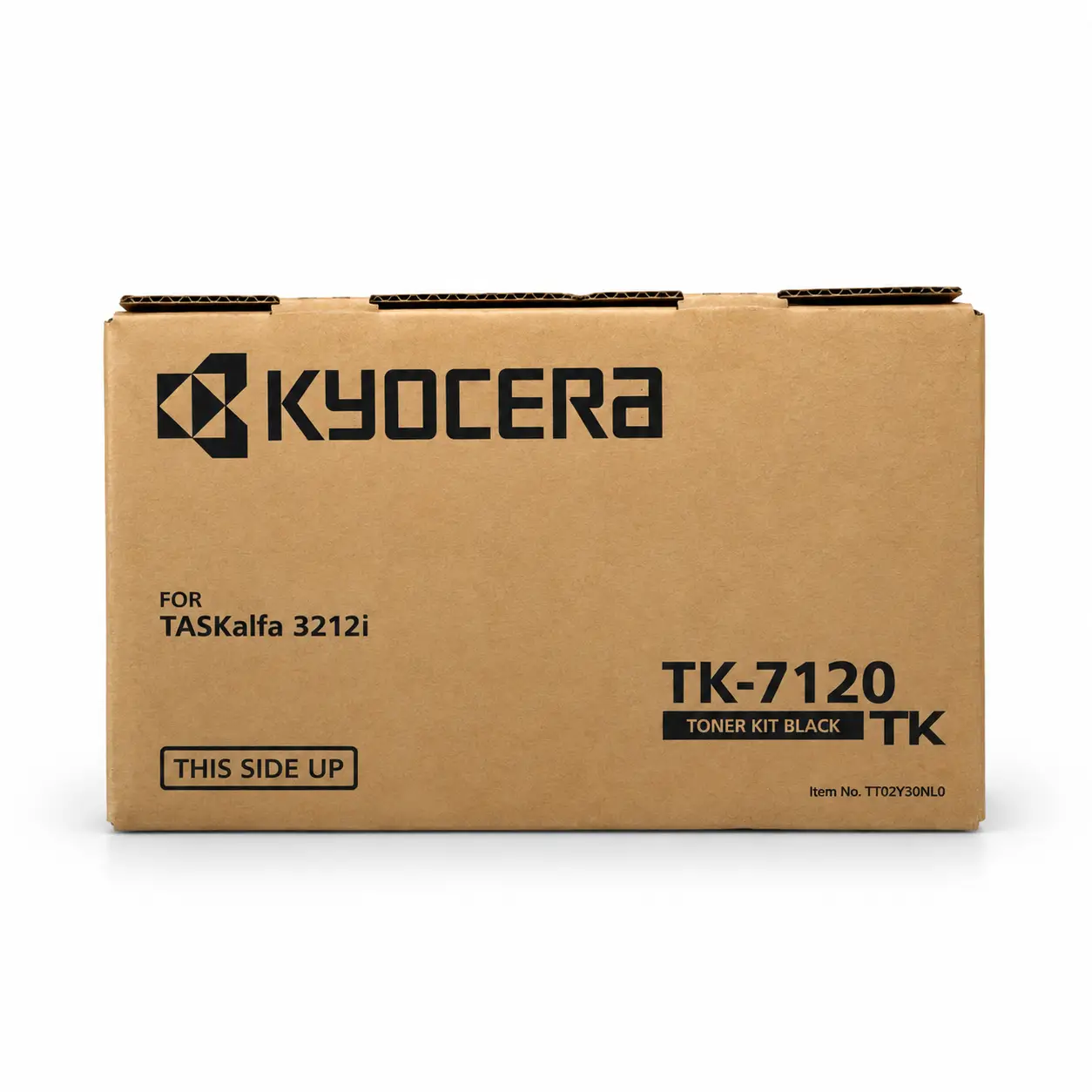
Kyocera TK-7120 Genuine Black Toner
Quick Overview
-
- Model: Kyocera TK-7120 Genuine Black Toner
- Item Category – Copier Toner
- Printing Color – Black
- Printing Technology – Laser
- Duty Cycle up to (Yield) – 20000 Pages
Kyocera TK-7120 Genuine Black Toner Order now or call us for product details and availability. 01727757903
৳ 12,500 ৳ 14,000
Kyocera TK-7120 Genuine Black Toner Cartridge: The Ultimate Printing Solution Guide
Table of Contents
-
Introduction
-
What Is Kyocera TK-7120 Genuine Black Toner Cartridge?
-
Why Choose Genuine Kyocera Toner?
-
Product Specifications & Technical Overview
-
Printer & Copier Compatibility
-
Understanding Page Yield and Cost-Per-Page Analysis
-
How to Identify Genuine vs. Counterfeit Toner
-
Business Applications and Key Benefits
-
Step-by-Step Installation Guide
-
Storage and Handling Best Practices
-
Troubleshooting Common Toner Issues
-
Eco-Friendly Printing & Sustainability
-
Frequently Asked Questions (FAQ)
-
Final Thoughts
1. Introduction
In modern corporate offices, legal firms, educational institutions, financial hubs, and commercial printing environments, document management is vital to everyday operations. Contracts, financial statements, administrative reports, and official correspondence must be produced daily with speed, accuracy, and absolute clarity. To handle these demanding document workflows efficiently, a high-performing monochrome printing system is non-negotiable.
Kyocera document solutions—particularly their TASKalfa series of multifunction copiers—are globally recognized for their durability, speed, and cost-efficient operation. However, keeping these high-end machines performing at their factory standard requires using genuine consumables. The Kyocera TK-7120 Genuine Black Toner Cartridge is specifically engineered to protect your device while delivering crisp, dark, and professional monochrome output on every single page.
2. What Is Kyocera TK-7120 Genuine Black Toner Cartridge?
The Kyocera TK-7120 is an Original Equipment Manufacturer (OEM) toner cartridge manufactured directly by Kyocera Document Solutions. It contains high-grade microfine black toner powder formulated specifically for precision laser printing.
Unlike third-party alternatives, genuine Kyocera toner is designed to work in perfect synchronization with Kyocera’s long-life ceramic drum technology and high-temperature fuser assemblies. This smooth integration ensures that toner particles melt uniformly at exact operating temperatures, creating sharp text and clear graphic lines without dusting or smudging.
3. Why Choose Genuine Kyocera Toner?
While non-genuine or refilled toner cartridges may appear cost-effective initially, they often lead to poor print quality, hidden maintenance expenses, and hardware damage over time. Investing in the original Kyocera TK-7120 Genuine Black Toner provides several clear advantages:
A. Extended Drum & Fuser Protection
Kyocera equipment features long-life ceramic drum units designed to last for hundreds of thousands of prints. The microfine particles in genuine TK-7120 toner are uniformly shaped, reducing friction and preventing scratches or premature wear on the drum and fuser roller surfaces.
B. Crisp, Professional Output Quality
Whether you are printing fine-font contracts, financial spreadsheets, or high-density barcodes, deep black contrast is crucial. Kyocera TK-7120 Genuine Black Toner provides sharp line definition and consistent density across the entire page without ghosting or background shading.
C. Zero-Waste System Efficiency
Kyocera’s advanced cartridge technology eliminates unnecessary toner waste. Almost 100% of the toner inside the Kyocera TK-7120 Genuine Black Toner kit is utilized during the image transfer process, keeping your printer interior clean and lowering total operational waste.
4. Product Specifications & Technical Overview
Review the technical details of the Kyocera TK-7120 Genuine Black Toner before making your purchasing decision:
| Feature / Attribute | Technical Specification |
| Brand | Kyocera Document Solutions |
| Model Code | Kyocera TK-7120 Genuine Black Toner |
| Toner Color | Black (Monochrome) |
| Printing Technology | Laser |
| Approximate Page Yield | ~20,000 Pages (A4 at 5% ISO/IEC coverage) |
| Compatible Equipment | Kyocera TASKalfa 3212i |
| Package Weight | Approx. 1.2 kg / 2.6 lbs |
| Country of Origin | Japan / Official Kyocera Facility |
| Official Verification | Verify original specs on the Kyocera Official Website |
5. Printer & Copier Compatibility
Verifying hardware compatibility is essential to avoid operational delays or mechanical damage caused by fitting an incorrect cartridge model.
The Kyocera TK-7120 Genuine Black Toner kit is explicitly manufactured for the following multifunction equipment:
-
Kyocera TASKalfa 3212i (Monochrome Multifunction Printer)
Pro Tip: Never force a toner cartridge into place. If your printer model differs (e.g., TASKalfa 3010i or TASKalfa 3501i), the Kyocera TK-7120 Genuine Black Toner kit will not fit. Always double-check the front panel of your machine or the user manual to confirm the required consumable model code.
6. Understanding Page Yield and Cost-Per-Page Analysis
What Is Page Yield?
Page yield refers to the estimated total number of standard pages a toner cartridge can produce before depletion. The Kyocera TK-7120 Genuine Black Toner features an official rating of approximately 20,000 pages, tested according to ISO/IEC 19752 standards based on 5% page coverage on A4 paper.
What Does 5% Coverage Mean?
A standard 5% coverage page represents a basic business letter or standard text document with moderate margins and normal font sizes.
Variables That Affect Actual Output:
-
Document Density: Printing bold text, dense data tables, or heavy graphics consumes significantly more toner per page.
-
Paper Type & Size: Larger media sizes (e.g., A3 paper) or textured heavy stock increase toner consumption.
-
Print Settings: Draft or Eco-modes use less toner per page, whereas high-resolution settings consume more.
Cost-Per-Page Advantage
Although OEM cartridges carry a higher upfront cost than refilled or generic alternatives, the Kyocera TK-7120 Genuine Black Toner delivers lower total cost per page over its lifespan. It eliminates costly reprint cycles, prevents machine downtime, and protects expensive drum replacements.
7. How to Identify Genuine vs. Counterfeit Toner
Counterfeit printer consumables are common in the marketplace. To ensure you receive an original Kyocera TK-7120 Genuine Black Toner, inspect the product using these checks:
-
Security Hologram: Genuine Kyocera packaging features a distinct optical hologram sticker. When tilted under light, it shifts colors and displays the official Kyocera logo clearly.
-
Packaging Quality: Original boxes use crisp, high-grade printing with sharp typography, accurate logos, and clear barcode labels.
-
Matching Serial Numbers: Verify that the serial number on the outer packaging matches the code stamped onto the plastic body of the inner cartridge.
-
Manufacturer Verification: You can cross-reference part numbers and accessory lists directly on the manufacturer’s documentation page. Check details on the Kyocera Official Product Options Page to confirm compatibility.
8. Business Applications and Key Benefits
High-volume enterprise operations rely on the Kyocera TK-7120 Genuine Black Toner for dependable day-to-day performance across multiple industries:
-
Corporate Offices: Ensures daily administrative memos, reports, and internal documentation are printed quickly without fading or smudging.
-
Legal & Compliance: Produces dark, sharp text that remains readable on legal filings and long-term archival documents.
-
Banking & Finance: Delivers precise line definition essential for small fonts on audit sheets, invoices, and financial ledgers.
-
Commercial Copy Shops: Reduces overall system downtime, allowing business owners to deliver high-quality client prints consistently.
9. Step-by-Step Installation Guide
Replacing a used Kyocera TK-7120 Genuine Black Toner on your Kyocera TASKalfa printer is straightforward and requires no specialized tools.
+-------------------------------------------------------+
|  Step 1: Open the front access cover of the printer   |
+-------------------------------------------------------+
                           ↓
+-------------------------------------------------------+
|  Step 2: Release lock lever & remove empty cartridge  |
+-------------------------------------------------------+
                           ↓
+-------------------------------------------------------+
|  Step 3: Unpack new TK-7120 & rock 5-6 times gently   |
+-------------------------------------------------------+
                           ↓
+-------------------------------------------------------+
|  Step 4: Slide cartridge into slot until it clicks    |
+-------------------------------------------------------+
                           ↓
+-------------------------------------------------------+
|  Step 5: Close front cover & run a test print         |
+-------------------------------------------------------+
Detailed Instructions:
-
Access the Bay: Open the front access door on your TASKalfa machine.
-
Remove Spent Unit: Press the release lever to unlock the empty toner cartridge and pull it straight out carefully.
-
Prepare the New Cartridge: Remove the new genuine TK-7120 from its packaging. Hold it horizontally with both hands and rock it side-to-side 5 to 6 times to distribute the internal toner powder evenly.
-
Insert and Lock: Align the new cartridge with the guide rails inside the compartment and slide it in firmly until you hear a clear click sound.
-
Close and Initialize: Close the front cover securely. The printer will initialize for a few seconds. Print a test page to confirm installation.
10. Storage and Handling Best Practices
To keep unused Kyocera TK-7120 Genuine Black Toner in optimal condition:
-
Temperature Control: Store cartridges in a dry room between 10°C and 30°C (50°F–86°F). Extreme heat can cause toner particles to clump together.
-
Keep Sealed: Keep the toner inside its original sealed protective packaging until the moment of installation.
-
Store Horizontally: Always store toner boxes lying flat. Storing cartridges vertically causes toner powder to compress at one end.
-
Avoid Direct Light: Protect unused cartridges from direct sunlight or intense UV exposure.
11. Troubleshooting Common Toner Issues
If you experience unexpected output quality after installing a replacement toner, follow these initial diagnostic steps:
-
Faded Prints: Ensure you rocked the new cartridge before installation. Check if “EcoPrint” or “Draft Mode” is enabled in your print preferences.
-
“Toner Not Recognized” Error: Remove the Kyocera TK-7120 Genuine Black Toner, inspect contacts for dust, re-insert it firmly, and ensure the access door is completely closed.
-
Streaks or Lines: Clean the main charger wire inside the printer using the built-in wiper mechanism as outlined in your user manual.
12. Eco-Friendly Printing & Sustainability
Kyocera is committed to environmental sustainability across its manufacturing operations:
-
Recyclable Materials: Kyocera TK-7120 Genuine Black Toner are constructed from non-toxic, recyclable plastics designed to minimize environmental impact.
-
Clean Indoor Air: Genuine Kyocera toner formulas contain no hazardous heavy metals (such as lead, cadmium, or mercury), protecting indoor office air quality during high-volume printing runs.
13. Frequently Asked Questions (FAQ)
Q1: What is the estimated page yield for the Kyocera TK-7120 Genuine Black Toner?
A: The manufacturer rates the Kyocera TK-7120 Genuine Black Toner for approximately 20,000 pages at 5% A4 page coverage.
Q2: Can I use the Kyocera TK-7120 Genuine Black Toner in color Kyocera printers?
A: No, the Kyocera TK-7120 Genuine Black Toner is a monochrome (black) toner cartridge specifically engineered for compatible monochrome TASKalfa laser machines.
Q3: How do I verify if my Kyocera TK-7120 Genuine Black Toner toner is original?
A: Inspect the optical hologram on the packaging and cross-check model details on the Kyocera Official Website.
Q4: Will using third-party toner void my machine warranty?
A: Damage caused specifically by non-genuine or refilled toner (such as drum scratches or fuser damage) is generally not covered under manufacturer warranty agreements.
14. Final Thoughts
The Kyocera TK-7120 Genuine Black Toner Cartridge is the benchmark choice for businesses using Kyocera TASKalfa 3212i multifunction copiers. Offering a high yield of ~20,000 pages, flawless compatibility, and crisp output quality, it protects your printer hardware while ensuring long-term operational cost savings.
Always choose original Kyocera supplies to keep your office workflows efficient, professional, and reliable. To check more related toner options, explore our full collection of Toner Cartridges.
Based on 0 reviews
Be the first to review “Kyocera TK-7120 Genuine Black Toner”
Related products
-
Toner Cartridge, Toshiba
T-2323C Compatible Toner for Toshiba Photocopier
Key Features
- Model: T-2323C Compatible Toner
- Supported model: 2523A, 2523AD, 2323AM, 2823AM, 2329A, 2829A
- Duty cycle: 12,000+ Pages
- Printing technology: Laser
- Printing color: Black
T-2323C Compatible Toner for Toshiba Photocopier Order now or call us for product details and availability. 01727757903
SKU: n/a -
Toner Cartridge, Toshiba
T-2323C Original Toner for Toshiba Photocopier
Key Features
- Model: T-2323C Toner
- Supported model: 2523A, 2523AD, 2323AM, 2823AM, 2329A, 2829A
- Duty cycle: 16,000+ Pages
- Printing technology: Laser
- Printing color: Black
T-2323C Original Toner for Toshiba Photocopier Order now or call us for product details and availability. 01727757903
SKU: n/a -
Toner Cartridge, Sharp
Sharp BP-AT300 Black Original Toner
Key Features
- Model: Sharp BP-AT300 Black Original Toner
- Printing Color: Black
- Printing Technology: Laser
- Duty Cycle up to (Yield): 27500 Pages
- Supported : BP-30M35, BP-30M31, BP-30M28
Sharp BP-AT300 Black Original Toner for Sharp Photocopier Order now or call us for product details and availability. 01727757903
SKU: n/a

There are no reviews yet.